
Cloud-Based Construction Estimating Software: Benefits, Risks, and Best Practices
Cloud-based construction estimating software runs on remote servers and lets estimators build, price, and share bids from any device with an internet connection. The category reached $3.07 billion in global value in 2026, according to Mordor Intelligence (2026), and cloud deployment already holds close to 69% of that spend.
That shift didn’t happen by accident. Paper takeoffs and disconnected spreadsheets cost firms hours per bid and, worse, hide the one pricing mistake that turns a winning job into a losing one.
This guide walks through what cloud-based construction estimating software actually does, where it pays off, where it introduces new risk, and how a contractor rolls it out without breaking a bidding season. Expect real numbers, not vague reassurance.
Who Uses Cloud-Based Construction Estimating Software?
- General contractors: They use it to assemble multi-trade bids, track subcontractor quotes, and convert winning estimates directly into job budgets.
- Specialty trade contractors: Electrical, mechanical, concrete, and roofing contractors rely on trade-specific assembly libraries aligned with association standards such as NECA or MCAA.
- Residential builders and remodelers: These professionals lean on template-driven estimating to turn around fast, consistent quotes for smaller jobs.
- Preconstruction and design-build teams: All of the design teams connect estimates to BIM models so quantity changes flow automatically as designs evolve.
- Owners and developers: They use estimating data during feasibility studies to compare project scope against budget before committing capital.
What Is Cloud-Based Construction Estimating Software?
Cloud-based construction estimating software is a web-hosted platform that calculates material, labor, equipment, and subcontractor costs for a construction bid without requiring a local install.
Data lives on a vendor’s servers, not one estimator’s laptop. Everyone on the team opens the same project through a browser, and every change syncs instantly.
A construction takeoff measures quantities from a drawing set. A cost database prices those quantities using current labor and material rates. An assembly group related line items- concrete, rebar, formwork, and finishing labor.
Relation Between Cloud-Based Estimating and BIM
Building Information Modeling, or BIM, is a 3D design method that stores physical and functional data about a structure inside a single digital model. When an estimating platform connects to a BIM file, it extracts quantities directly from the model instead of a flat 2D drawing, which removes a layer of manual measurement and the errors that come with it.
A cost database is a repository of unit prices (material costs, labor rates, and equipment rental fees) that a platform references to price out individual line items. High-tier platforms link to third-party sources such as RSMeans or Craftsman for localized, current pricing rather than static, self-maintained spreadsheets.
| Component | What It Does |
| Takeoff engine | Extracts quantities from 2D or 3D drawings, including PDF plan sets and BIM models. |
| Cost database | Stores unit prices for labor, materials, and equipment; often syncs with RSMeans or Craftsman-style feeds. |
| Assembly library | Bundles related cost items into a single, reusable pricing block. |
| Collaboration layer | Let multiple estimators, PMs, and subcontractors edit or view the same live bid. |
| Reporting module | Generates proposals, bid comparisons, and margin analysis for leadership review. |
How Big Is the Cloud-Based Construction Estimating Software Market?
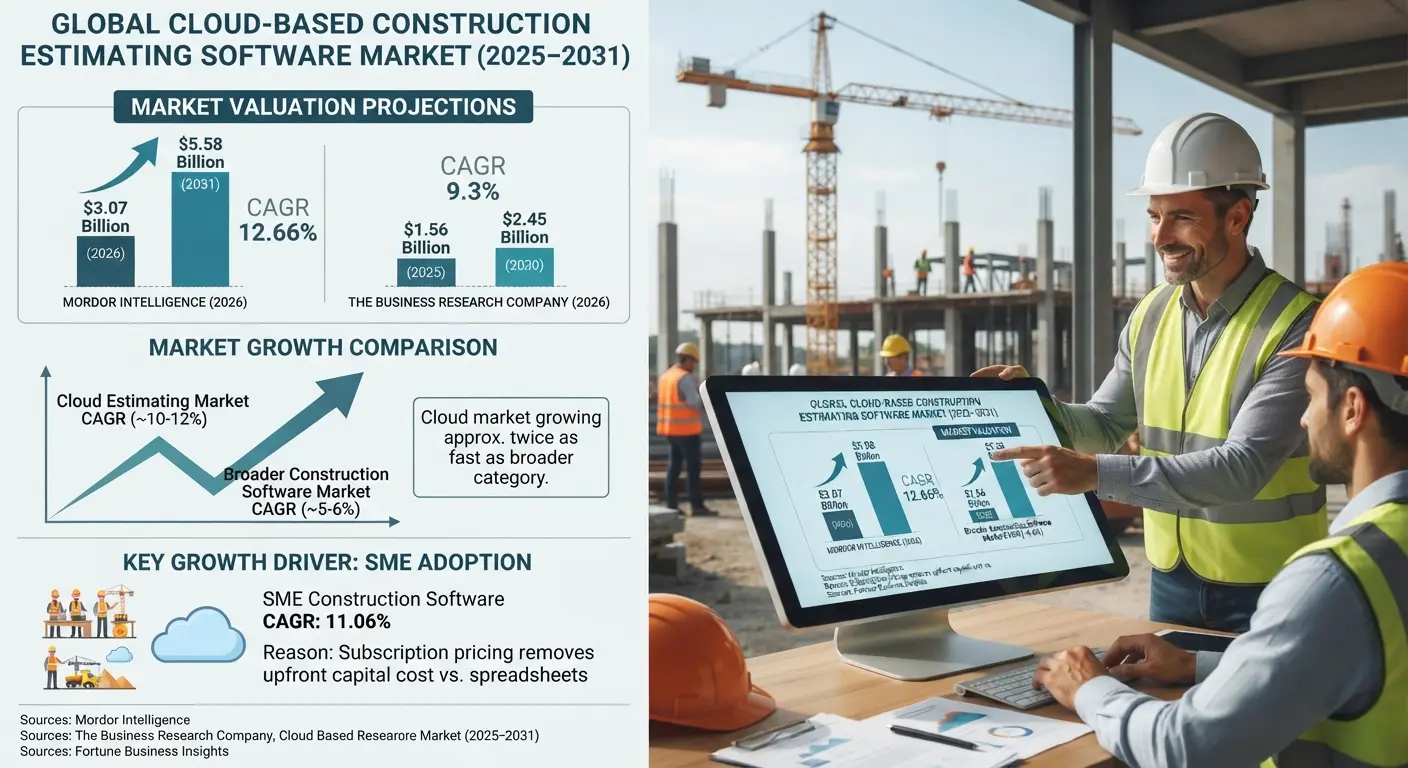
The construction estimating software market was valued at $3.07 billion in 2026 and is projected to reach $5.58 billion by 2031, a 12.66% compound annual growth rate, according to Mordor Intelligence (2026).
The Business Research Company (2026) puts the figure slightly lower, $1.56 billion in 2025, climbing to $2.45 billion by 2030 at a 9.3% CAGR.
Numbers vary by methodology, but the direction doesn’t. That means the market is growing roughly twice as fast as the broader construction software category, which Fortune Business Insights (2026) values at $11.78 billion for the current year.
Small and mid-sized firms are driving a disproportionate share of that growth. According to Fortune Business Insights (2026), the SME segment of the wider construction software market is expanding at an 11.06% CAGR, faster than large-enterprise adoption, largely because subscription-based cloud pricing removes the upfront capital cost that used to keep smaller contractors on spreadsheets.
What Are the Benefits of Cloud-Based Construction Estimating Software?
Cloud-based construction estimating software delivers faster bid turnaround, live pricing accuracy, team-wide collaboration, and automatic data backup. Here’s where the numbers back that up.
1. Speed
Assembly libraries and automated calculations cut estimated development time by 30-50%, according to Beck Technology (2026).
2. AI-Assisted Acceleration
AI-driven takeoff tools reduce estimate completion time by 51.3% on average and improve accuracy by 20.4%, per Dan Cumberland Labs (2026).
3. Recovered Hours
Small firms of 5 to 50 employees free up an estimated 260 hours annually after adopting AI estimating tools, according to Dan Cumberland Labs (2026).
4. Collaboration
Estimators, project managers, and subcontractors edit the same live project simultaneously, removing the version chaos that comes from merging separate spreadsheets.
5. Accountability
Cloud platforms log every change, approval, and update, creating an audit trail that documents scope decisions long after a bid is submitted, per Buildern (2026).
6. Scalability
A growing estimating team adds seats and storage without new servers, IT staff, or capital equipment purchases.
7. Roi Timeline
Firms actively bidding typically reach full payback on cloud estimating tools within 3-6 months, according to Dan Cumberland Labs (2026).
How Does Cloud Estimating Compare to Spreadsheets and Desktop Software?
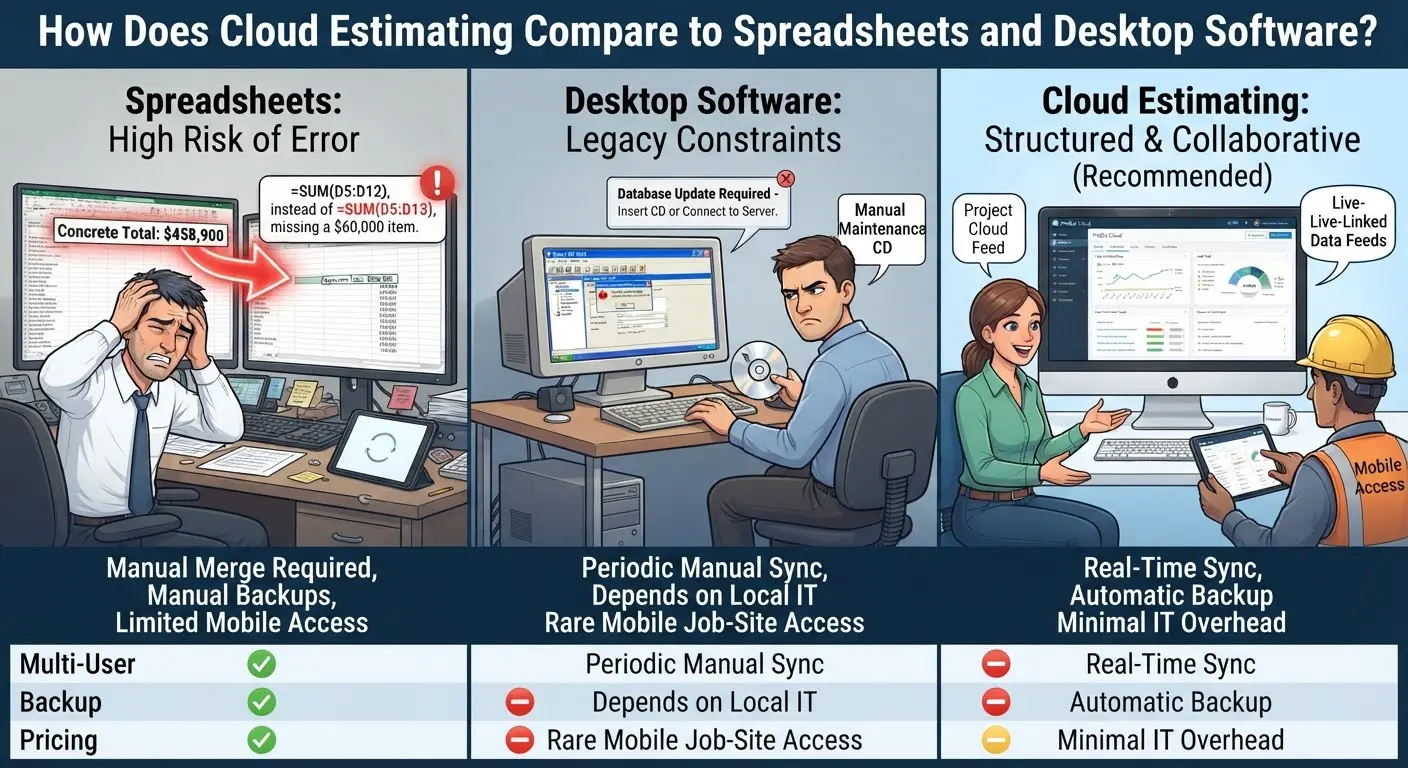
A misplaced decimal in one spreadsheet cell can shift a six-figure bid by thousands of dollars, and nobody notices until the postmortem. Cloud platforms tie every quantity to a structured data record instead of a free-floating number, which makes a bid reviewable on evidence rather than trust.
| Factor | Spreadsheets | Desktop Software | Cloud Software |
| Multi-user editing | Manual merge required | Single-user, local file | Real-time, simultaneous |
| Backup & recovery | Manual, error-prone | Depends on local IT | Automatic, off-site |
| Pricing updates | Manual re-entry | Periodic manual sync | Live-linked data feeds |
| Mobile job-site access | Limited | Rare | Standard |
| IT overhead | Low, but risk-heavy | Moderate to high | Minimal |
| Offline capability | Full | Full | Varies by vendor |
Pricing illustrates the gap well. A mid-market cloud estimating seat runs roughly $149-$299 per month for most contractors, per Dan Cumberland Labs (2026), while a comparable desktop license historically required a larger upfront purchase plus a paid annual maintenance contract just to keep the cost database current. Method A, the cloud subscription, spreads cost over time and includes updates. Method B, the legacy desktop license, front-loads cost and leaves pricing data stale until someone manually refreshes it.
What Are the Risks of Cloud-Based Construction Estimating Software?
The primary risks of cloud-based construction estimating software are cybersecurity exposure, internet dependency, vendor lock-in, and unclear data ownership.
1. Rising Attack Surface
Data breaches affecting construction firms increased 800% between 2019 and 2020, according to ConstructConnect (2024).
2. Breach Cost
The global average cost of a data breach reached $4.44 million in 2025, according to IBM data reported by Secureframe (2025).
3. Human Error
Up to 88% of cyber incidents trace back to human error rather than a system flaw, according to VikingCloud (2026).
4. Connectivity Gaps
Contractors working in low-signal areas need a confirmed offline mode, since a cloud tool without one stalls the moment the connection drops, per Eano (2026).
5. Vendor Lock-In
Switching platforms means migrating years of historical cost data and retraining every estimator on a new workflow.
6. Configuration Risk
A misconfigured cloud environment exposed 149 million records in a single incident in January 2026, according to ACI Learning (2026), a reminder that the vendor’s settings matter as much as its marketing.
None of this means cloud estimating is inherently less safe than a spreadsheet on a shared office drive. It means the risk shifts location. A laptop stolen from a job-site trailer used to be the biggest threat to an estimate. Today, that risk moves to credential theft, misconfigured permissions, and third-party integrations that quietly widen the attack surface.
|
A Note To Remember! |
|
Security teams take an average of 277 days to identify and contain a breach once it starts, according to SentinelOne (2026), which is precisely why prevention matters more than detection in a bid-heavy workflow where timelines are already tight. |
How Secure Is Data in Cloud-Based Construction Estimating Platforms?
Reputable cloud estimating vendors secure data through encryption in transit and at rest, SOC 2 compliance, redundant off-site backups, and role-based access controls.
DESTINI Estimator, for example, runs on a SOC 2-compliant cloud infrastructure, according to Beck Technology (2026), which removes the burden of building and maintaining that security layer in-house. That distinction matters because SOC 2 audits verify how a vendor actually handles data, not just what its website claims.
Security controls worth confirming before signing a contract:
- Multi-factor authentication on every user account, not just admin logins.
- Encryption both at rest and in transit, verified through the vendor’s own compliance documentation.
- Role-based permissions so subcontractors see only the sections relevant to their scope.
- A documented, exportable offline or local-backup option for connectivity gaps.
- Independent third-party security audits performed on a recurring schedule, not a one-time certification.
What Features Should Contractors Look for in Cloud Estimating Software?
| Feature | Why It Matters | Example Capability |
| 2D/3D takeoff | Converts drawings into measurable quantities without manual counting. | BIM-linked quantity extraction |
| Cost database | Keeps pricing current as material and labor costs shift. | Regionalized costing data, 23,000+ line items |
| ERP/accounting sync | Turns an accepted bid into a job budget without re-entry. | QuickBooks, Sage, Procore integration |
| Mobile access | Lets estimators review or adjust bids from the job site. | Browser or app-based field access |
| Reporting & audit trail | Documents scope and pricing decisions for later review. | Change-order and approval logging |
| Offline mode | Keeps work moving where connectivity is unreliable. | Local cache with automatic re-sync |
How Do Leading Cloud-Based Construction Estimating Platforms Compare?
Dozens of construction estimating software compete in this space, each built around a different workflow. The table below lists verifiable, vendor-reported characteristics rather than rankings; the right fit depends on trade, project size, and existing tech stack.
| Platform | Primary Focus | Deployment | Notable Data Point |
| Autodesk ProEst | 2D takeoff, cost estimating, bid-day analysis | Cloud | Costbook database with 23,000+ regionalized cost lines |
| STACK | AI-enhanced takeoff, aerial roof measurement | Cloud | Automatic proposal generation from takeoff data |
| Knack | No-code, customizable estimating workflows | Cloud | Mobile-responsive access from any device |
| Acumatica (ProEst integration) | ERP-integrated construction estimating | Cloud | Job costing tied directly to weighted cost averages |
| ConWize | Preconstruction cost estimation, tender management | Cloud | Predictive analytics from historical bid data |
| DESTINI Estimator | Enterprise 2D/3D estimating | Cloud | SOC 2-compliant infrastructure |
| Eano | Small-contractor estimating with native app integrations | Cloud | Direct sync with QuickBooks, Angi, and Zapier |
Additional names worth researching for specific trades include Buildxact and Contractor Foreman for small residential builders, PlanSwift for takeoff-only workflows, and Kreo or Beam AI for firms testing lower-cost, AI-first estimating tools.
Optimize Your Workflow With Cloud-Based Estimating.
What Are Best Practices for Implementing Cloud-Based Estimating Software?
The strongest implementations start with a clean cost database, a phased rollout, and a named internal owner for the platform.
Software alone doesn’t fix a broken estimating process. On the contrary, it just runs the broken process faster. Firms that see the strongest results treat the rollout as a change to how the whole preconstruction team works. It should not be treated as a one-time construction bidding software purchase handed to the estimating department.
- Audit historical data first. Firms with organized records reach full productivity in 4-8 weeks, according to Dan Cumberland Labs (2026).
- Pilot on one project type. Run the new system alongside the old process for a single job category before a full switch.
- Standardize assemblies early. Build a shared assembly library so every estimator prices identical scopes the same way.
- Confirm integration paths. Verify the platform pushes accepted estimates directly into your accounting or ERP system without manual re-entry.
- Train around judgment, not just clicks. AI can automate up to 49% of estimating tasks, but the remaining 51% still depends on estimator experience with site access, drawing gaps, and local labor conditions, according to Dan Cumberland Labs (2026).
- Test the offline mode before go-live. Confirm field teams can still capture data during a connectivity outage.
- Revisit vendor security posture annually. Request updated SOC 2 or equivalent audit documentation every renewal cycle.
What Does the Future Hold for Cloud-Based Construction Estimating Software?
AI-assisted takeoff and predictive cost modeling are moving from optional add-ons to standard features across cloud estimating platforms.
Industry leaders increasingly expect AI-assisted workflows to become standard practice within the next two to three years, with attention shifting from basic quantity automation toward predictive risk modeling and cost forecasting, according to Bluebeam (2026). Voice-activated commands, BIM-linked quantity extraction, and automated risk flagging are already shipping in current releases rather than sitting on a roadmap.
Will Cloud-Based Estimating Software Replace Estimators?
None of that replaces the estimator. AI is a powerful assistant, not an authority. That means it recognizes patterns on clean drawings but can’t know that a specific site has restricted access or that a particular architect’s plans routinely miss structural detail, according to Bluebeam (2026). The tools speed up the first pass. The judgment that wins a profitable bid still belongs to the person reviewing it.
Frequently Asked Questions
Is cloud-based construction estimating software worth it for small contractors?
Yes. Small firms recover an estimated 260 hours per year after adopting cloud or AI-assisted estimating tools, according to Dan Cumberland Labs (2026), and entry-level plans now start as low as $35 per month.
Does cloud estimating software work without internet access?
Sometimes. Coverage varies by vendor; contractors working in low-connectivity areas should confirm a functional offline mode before signing a contract, per Eano (2026).
How long does it take to implement cloud estimating software?
One to two weeks for basic setup. Full team productivity typically takes 4-8 weeks, depending on how clean and digitized the firm’s historical cost data already is, according to Dan Cumberland Labs (2026).
Can cloud estimating software replace an experienced estimator?
No. AI can automate up to 49% of routine estimating tasks, but the remaining 51% depends on human judgment around site access, drawing gaps, and local labor conditions, according to Dan Cumberland Labs (2026).
What is the biggest security risk with cloud estimating platforms?
Misconfiguration and human error, not the cloud itself. Up to 88% of cyber incidents originate from human error rather than a platform vulnerability, according to VikingCloud (2026), which is why access controls and staff training matter as much as the vendor’s own security stack.
Does cloud estimating software integrate with accounting or ERP systems?
Most do. Leading platforms push accepted estimates directly into systems such as QuickBooks, Sage, or Procore, turning the bid into a job budget without manual re-entry, according to Beck Technology (2026) and Exeleon Magazine (2026).
How much does cloud-based construction estimating software cost?
Between $35 and $300 per user per month. Entry-level AI-assisted tools start near $35 monthly, while enterprise platforms with deep ERP integration average around $300 per user per month, according to Dan Cumberland Labs (2026) and Exeleon Magazine (2026).
Final Takeaway
Cloud-based construction estimating software has moved from a competitive edge to a baseline expectation across the industry. The benefits are well documented and growing. The risks (cybersecurity exposure, connectivity dependency, vendor lock-in) are real but manageable with the right vendor vetting and rollout plan.
Firms that treat the switch as an infrastructure decision, not just a software purchase, get the most out of cloud-based construction estimating software over the long run. If you don’t know the ultimate software for your next construction project, contact our construction estimating company and book a free consultation session for your project’s estimates.


